
Pricing Profiles
import { Aside } from ‘@astrojs/starlight/components’;
Source: Master Spec v2.0, §10.
The pricing term is Regular Price — never “Homeowner Price”.
Regular (default)
Section titled “Regular (default)”Uses the master Regular Price table. All authorized estimate users may override prices within the current estimate.
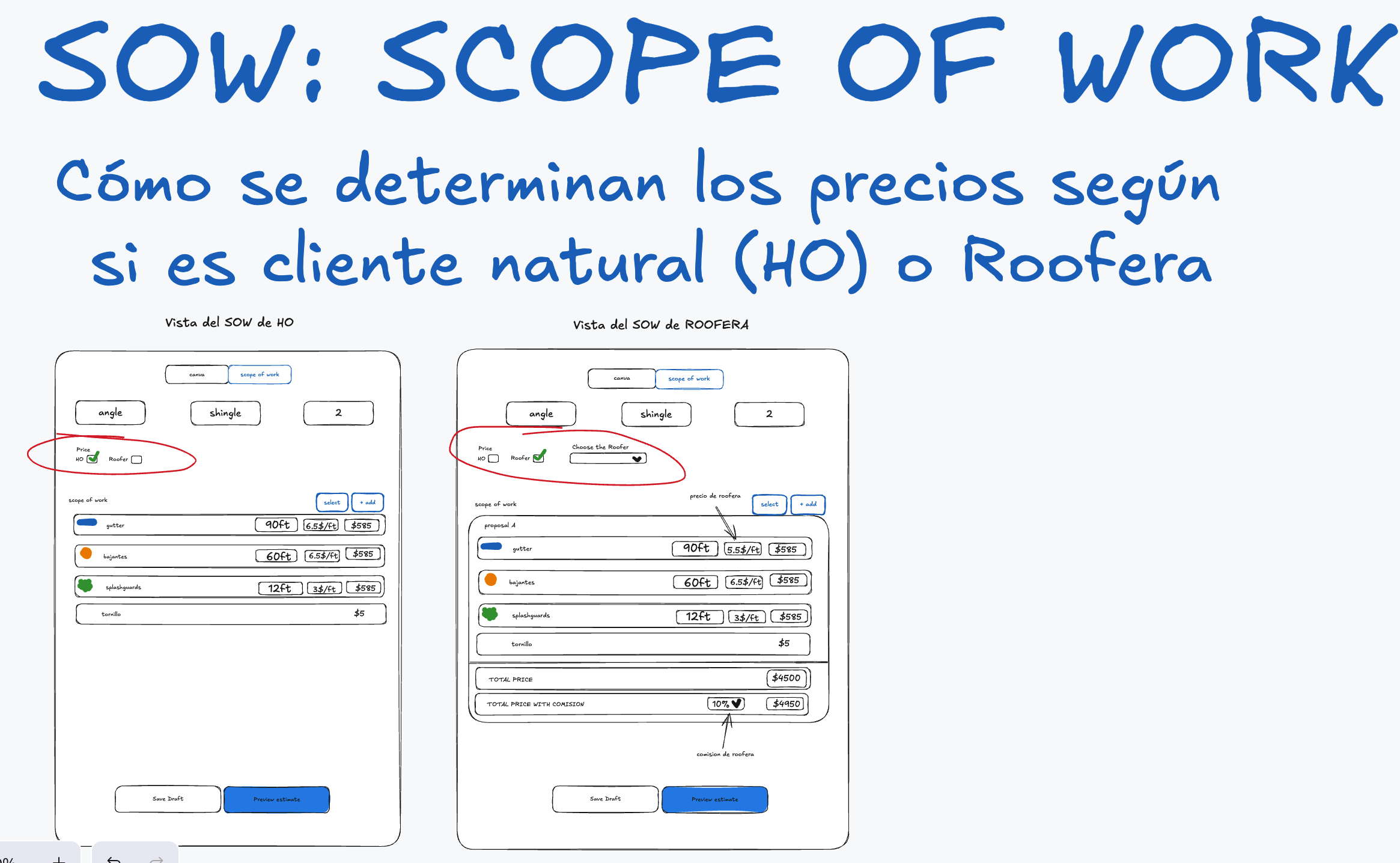
Visual reference 25 — approved visual direction for this section. The written requirements above prevail over labels, sample data, or prices shown in the images. See Scope of Work & Proposals references
Roofer
Section titled “Roofer”Requires selecting an active Roofer profile. Each profile has: unique Abbreviation, identifying icon color, 6 in K Style price/ft, 7 in K Style price/ft, Minimum Fee reference, default Commission Percentage.
- Minimum Fee is stored for administrative reference only — never auto-calculated, displayed, or inserted in Canvas, SOW, Preview, or Final Sketch.
- For 6 in and 7 in K Style gutters, the SOW uses the selected Roofer profile’s per-foot price. For every other product, it uses the optional Roofer Price from Products & Pricing, falling back to Regular Price when empty.
- Default commission loads automatically and may be overridden per estimate. Commission applies only when the profile’s Include Commission in SOW is enabled.
- Total Price with Commission = Base Total + (Base Total × Commission Percentage). Base Total comes from effective item totals or the entered Proposal Total. No separate Commission Amount display is required.
Choose Roofer dropdown
Section titled “Choose Roofer dropdown”Labeled Choose Roofer; opens a search field (Search by roofer name or abbreviation…) matching full name and Abbreviation case-insensitively. Each option shows: identifying color icon, Abbreviation, full Roofer Name (e.g. colored icon + ABC / ABC Roofing Company). Abbreviations must be unique among active profiles (recommended 2–8 chars). Keyboard, touch, and screen-reader navigation required. The color is a visual aid only — never in the Final Sketch.
If Admin later changes a Roofer’s name, abbreviation, color, rates, or commission, saved estimates keep their snapshot values.
Switching profiles
Section titled “Switching profiles”Switching Regular ↔ Roofer (or changing Roofer) requires confirmation — it replaces local price overrides and clears manually entered Proposal Totals. Recommended modal: title Change pricing profile?, message stating defaults/commission will replace manual adjustments, actions Cancel / Switch to Roofer. Works offline using the last synced catalog.
Price snapshots
Section titled “Price snapshots”Every estimate stores the product names, configurations, prices, and commission used. Master catalog changes never rewrite old estimates. Inactive Roofers stay identifiable in history but can’t be selected for new estimates. Local overrides never change master data.