
Scope of Work
import { Aside } from ‘@astrojs/starlight/components’;
Source: Master Spec v2.0, §9.
Structure
Section titled “Structure”Specifications section · Pricing Profile controls · individual product rows · Proposal cards · Select and Add Item actions · sticky Save Draft and Preview Estimate actions.
Each row shows only applicable fields: Product Name, Style, Type, Size, Material, Color, Quantity, Footage, Price per ft, Price per Unit, Total Price.
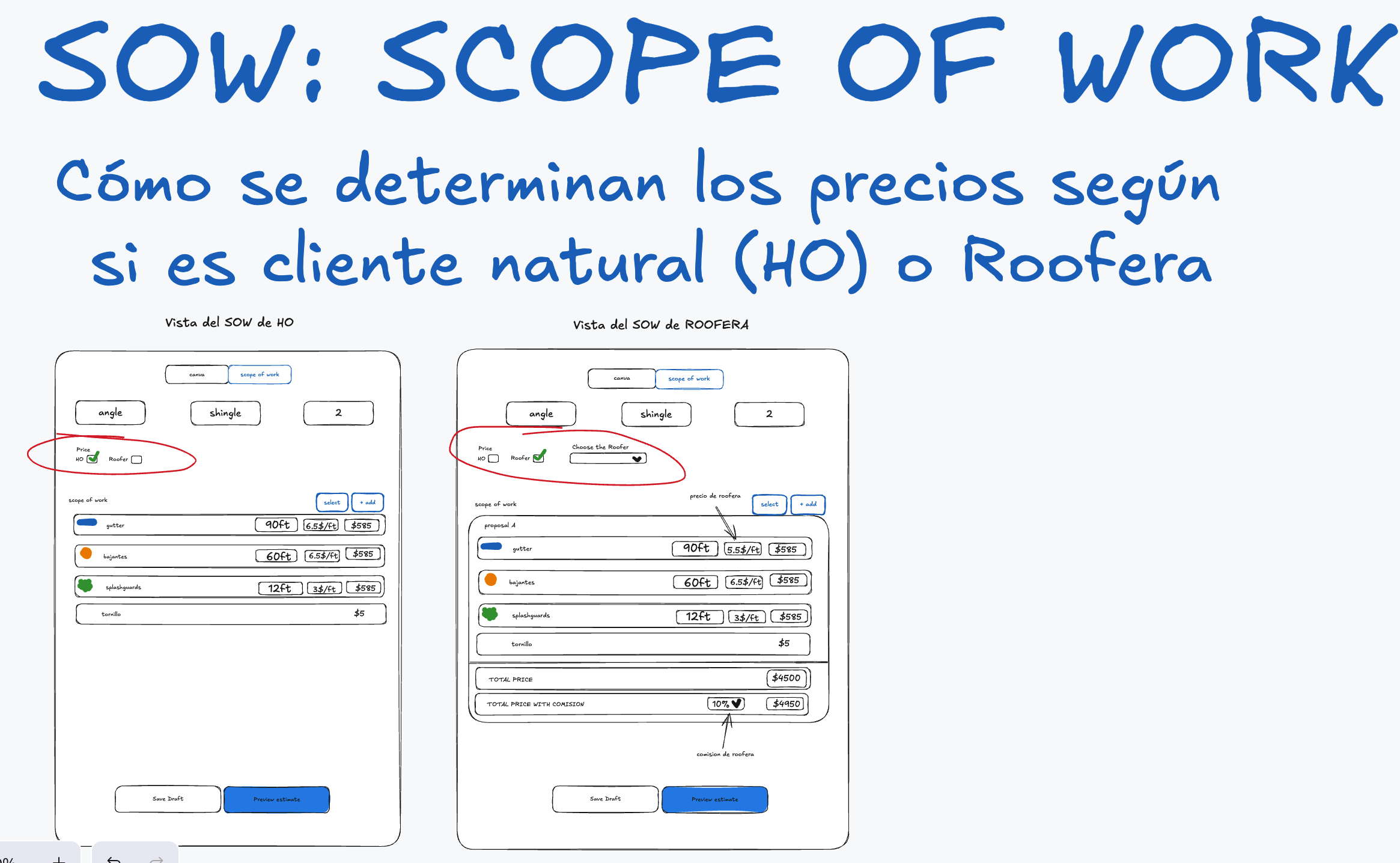
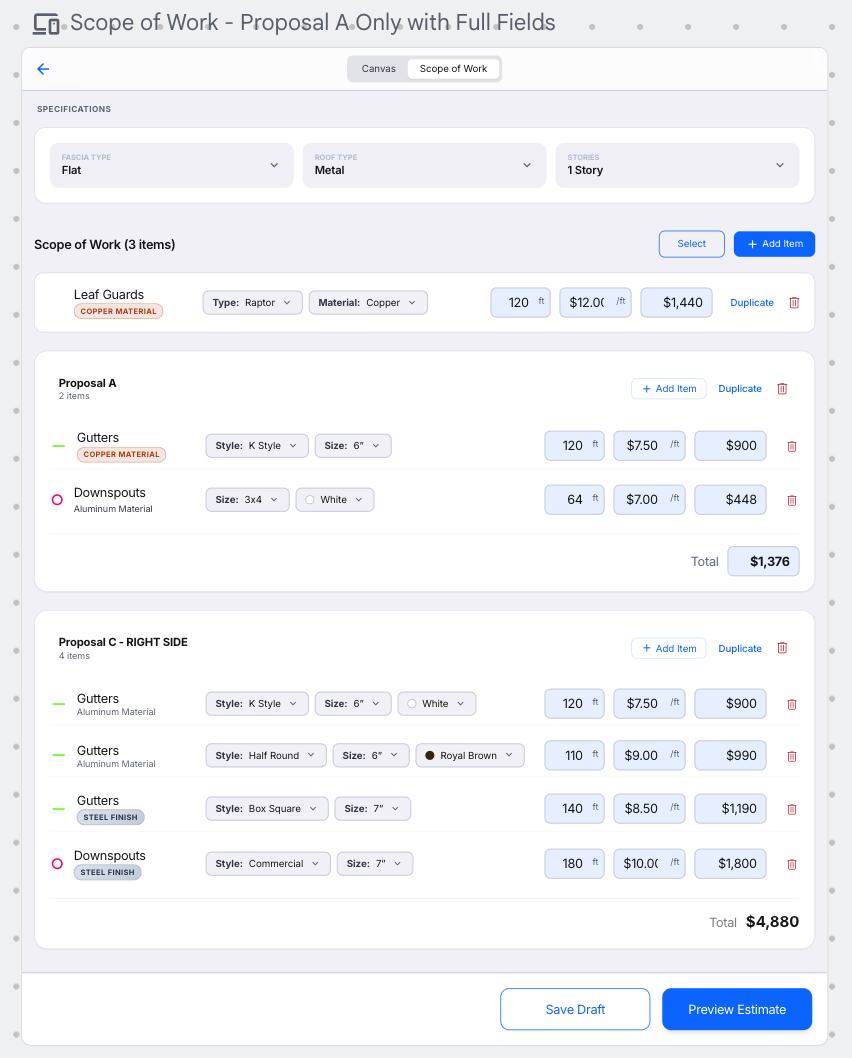
Visual references 25–26 — approved visual direction for this section. The written requirements above prevail over labels, sample data, or prices shown in the images. See Scope of Work & Proposals references
Automatic grouping (Canvas → SOW)
Section titled “Automatic grouping (Canvas → SOW)”The normal creation direction is Canvas → SOW: drawing or placing a commercial element automatically creates or updates its SOW row — the user never redraws it in the SOW. Intentionally SOW-only items are added via Add Item.
- One canvas line/symbol does not create a separate row when a compatible row already exists; compatible elements aggregate into one SOW item. Compatible = same catalog item + configuration + active pricing context.
- Example: placing Downspout circles repeatedly with the same Size/Material/applicable Color/Connected Gutter Size keeps one Downspout SOW item and adds 15 ft per new circle by default.
- Adding, editing, duplicating, reconfiguring, or deleting a canvas element updates its grouped SOW item. When the final canvas source for an automatic row is removed, the row is removed unless protected manual data requires confirmation.
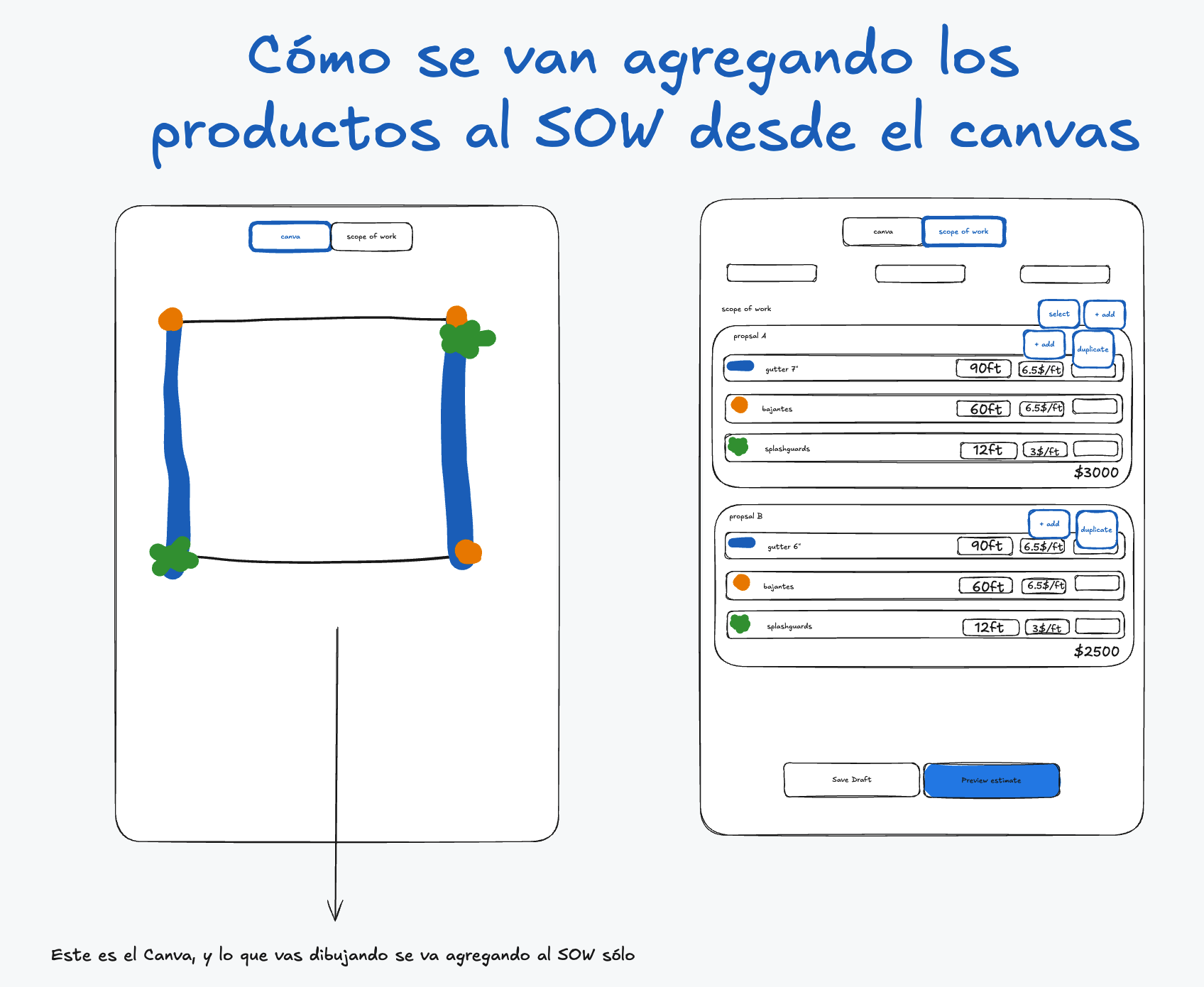
Visual reference 28 — approved visual direction for this section. The written requirements above prevail over labels, sample data, or prices shown in the images. See Scope of Work & Proposals references
Specifications
Section titled “Specifications”Fascia Type: Flat, Angled, Round, Exposed Rafter Tails · Roof Type: Tile, Metal, Shingles, Flat, Other · Stories: 1, 2, 3, 4+. All optional and informational only — they never change prices, always appear in the JPG, and empty values display as -.
Conditional configuration fields
Section titled “Conditional configuration fields”Rows dynamically show only valid attributes for the current Product/Style/Type/Size/Material:
- Aluminum: show the Color selector when the product supports color.
- Copper: hide Color completely (material defines the finish).
- Galvanized Steel Finish: hide Color completely.
- Changing Material immediately updates applicable fields and price lookup; a previously selected Color is cleared when the new Material doesn’t support it.
Custom dropdown values: every Size dropdown ends with Custom (reveals a required Custom Size free-text field); every Color dropdown ends with Custom plus TBD (Custom reveals required Custom Color). Custom never creates Size/Color fields where the product doesn’t support them. Copper and Galvanized Steel Finish hide Color entirely.
- TBD = final color not yet known (neutral swatch with
?, doesn’t block export, exports asColor: TBD). - Custom = known color outside the standard palette.
- A Custom Size has no automatic catalog price unless Admin configured a matching rule — otherwise price/total is manual. A Custom Color keeps the configured price unless Color is a price dimension (manual override still allowed).
Visual treatment
Section titled “Visual treatment”- Style/Size controls use neutral gray; never assign decorative colors to gutter Styles (confusable with commercial Color). Selection state may use a blue border/highlight.
- Copper = copper-toned badge; Galvanized Steel Finish = metallic gray/silver badge; Aluminum = neutral text/badge + Color selector. Never rely on color alone.
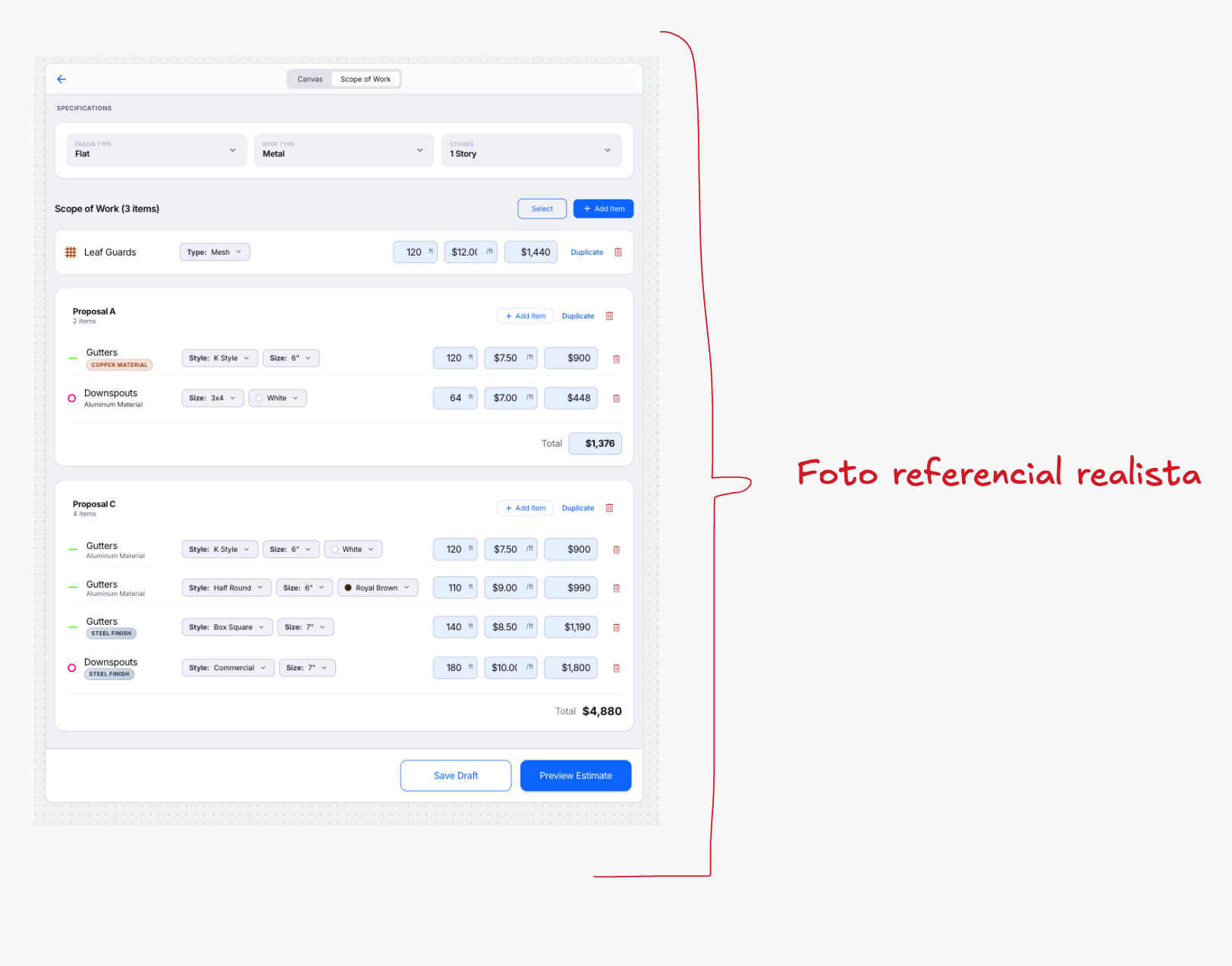
Visual reference 30 — approved visual direction for this section. The written requirements above prevail over labels, sample data, or prices shown in the images. See Scope of Work & Proposals references
Manually modified footage indicator
Section titled “Manually modified footage indicator”When the Estimator manually changes FT/Footage, the SOW field may use a soft yellow highlight plus a small indicator icon with an accessible tooltip/popover reading Manually adjusted (meaning must not depend on yellow alone). No persistent “Manually Adjusted” text. Resetting to the automatic value removes the indicator. The state is saved with the Working Copy/Editable Version. The yellow treatment is internal — never in Preview or Final Sketch — and must remain calm in light and dark modes.
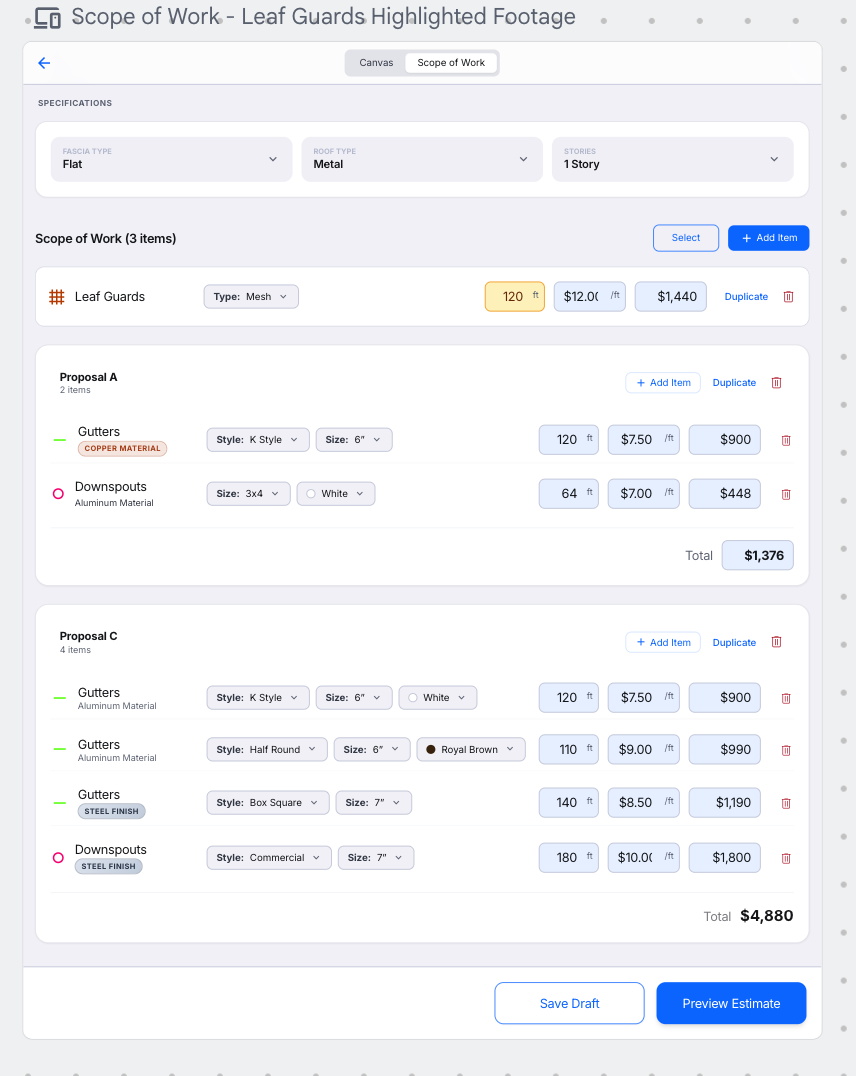
Visual reference 27 — approved visual direction for this section. The written requirements above prevail over labels, sample data, or prices shown in the images. See Scope of Work & Proposals references